
Access to the web interface
Accessing the Blitz Power Station web interface
Note
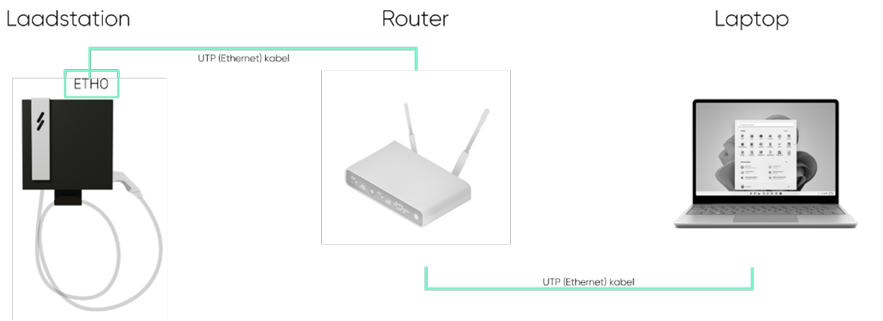
After starting up the charging station, the webpage becomes accessible after about 8 minutes. To access the platform, there are 2 different options:
Via Internet connection (see image next to this)
-
You must connect the ETH0 port via a router to access the Master BPS from your PC if it is connected to the same router.
-
Browse to: http://ev3000.local:3000.
-
The webpage opens and you can start the configuration.
-
We recommend assigning a static IP address to the charging station via the network settings now. Note: if the Blitz webpage does not open, follow this step.
Note
If the Blitz webpage does not open, follow these steps:
- Make sure the PC you are connecting with is set to DHCP (automatic IP address assignment) in the internet settings. You can check this via network connections:
Configuration via Modbus modbusTcp
-
Click on Load Management in the menu bar.
-
Enter a custom name under Charging Park Name.
-
Set the maximum current value of the fuse protecting the charging park under Load Circuit Fuse.
-
For High Level Measuring, choose the communication protocol. • IP Address
-
Enter the (IP) address of the energy meter from the electrical cabinet.
-
Device type is EEM377 (if the meter is supplied by Blitz Power).
-
Under Charging Points, select the charging points that should participate in Load Management.
-
Click Save: Success appears on the screen.
-
Perform a restart of the charging station.
Warning
Dynamic Load Management only works if the facilities for the charging station are tapped directly from the main fuse.
Configuration via RS485
Dynamic load management (WITH energy meter)
-
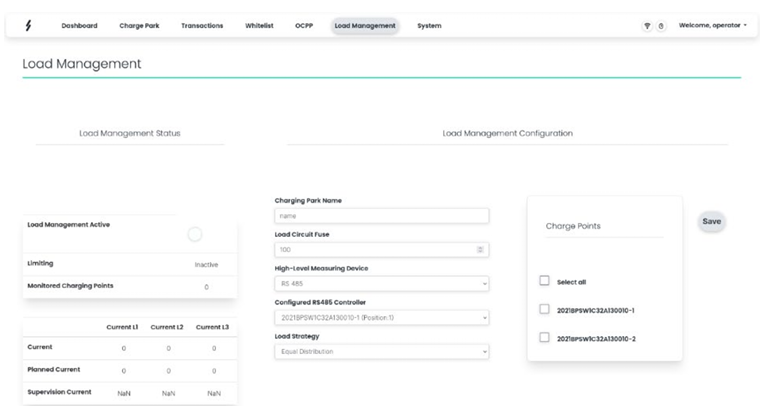
Click on Load Management in the menu bar.
-
Enter a custom name under Charging Park Name.
-
Set the maximum current value of the main fuse protecting the entire site under Load Circuit Fuse.
-
For High Level Measuring, choose the communication protocol. • RS 485 (modbus)
-
Select the name of the master charging station (position 1).
-
Under Charging Points, select the charging points that should participate in Load Management.
-
Click Save: Success appears on the screen.
-
Perform a restart of the charging station.
Warning
Dynamic Load Management only works if the facilities for the charging station are tapped directly from the main fuse.