

Marstek Inverters
Supported Devices
Note
Device Compatibility Please update your inverter to the latest firmware version to enable modbusTCP, this is supported from v144 onwards.
| Device Type | Variants | Modbus TCP (Ethernet) | RS485 | Curtailment |
|---|---|---|---|---|
| Venus-C | 2.5kWh | ✅ | ✅ | ❌ |
| Venus-E | 5.1kWh |
Note
Device Compatibility This integration was tested with Venus C device. However, other devices using the same communication protocol, such as Venus E, may also be compatible. If you have such a device, it is likely to work, but we are awaiting official confirmation from the manufacturer.
For the configuration of the device, please follow the guide: Marstek official guide
Wiring
The SmartgridOne Controller and the Marstek inverters communicate via RS485. From the V3 version of Marstek, there is native Modbus TCP support that can be used to connect directly through the LAN cable.
RS485
The RS485 port can be found in the following diagram and the cabling is depending on the version of the device.
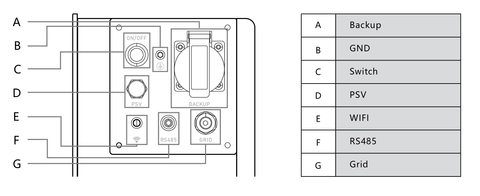
The A and B cables are different for V2 and V3. Below you can see the connection for V2.
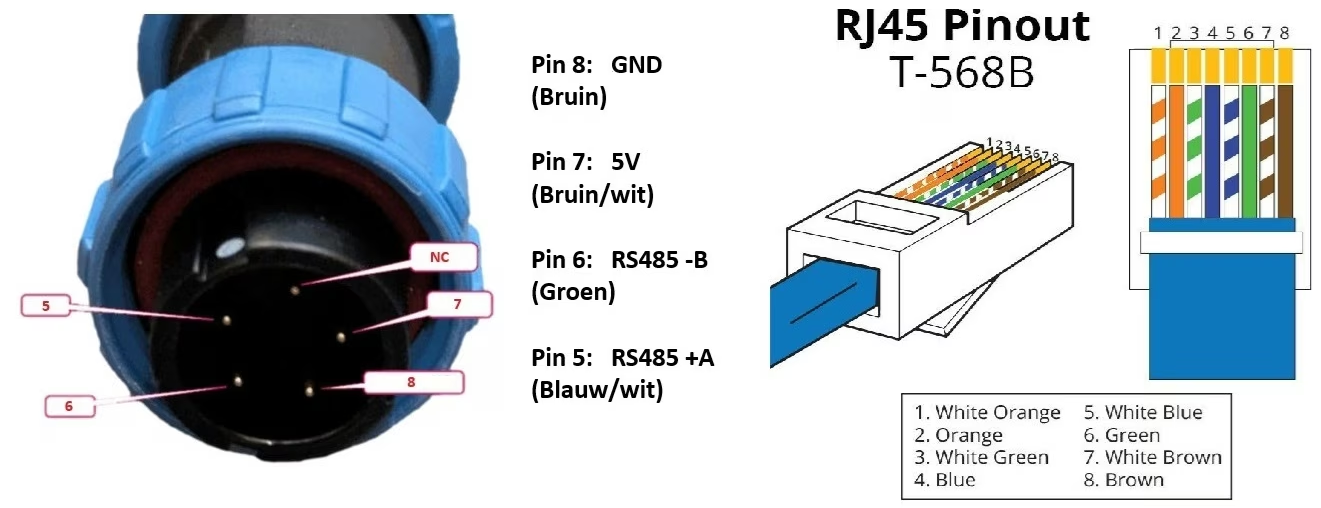
For V3 the cables 1 and 2 represent B and A respectively, while cables 4-5 are connecting to VCC amd 7-8 to GND. Once connected, the cable will be as such:
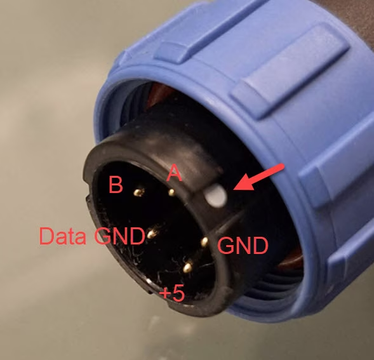
RS485 Wiring
- For correct RS485 wiring: Follow the guidelines for RS485 wiring.
- If the wiring shown in the table below is incorrect, please let us know.
- There is no general consensus in the industry about the usage of A and B for the RS485 polarity, so it may be counterintuitive and opposite of what you might expect for some devices.
| Device | SmartgridOne Controller model OM1 | SmartgridOne Controller model IG8 | RS485-USB converter | RS485-Ethernet converter |
|---|---|---|---|---|
| A | RS485 A | RS485_POS | RS485 A | TX+ |
| B | RS485 B | RS485_NEG | RS485 B | TX- |
| GND | RS GND | GND | Not available | G |
NOTE: RS485 Device Addresses
- You MUST give each device on the RS485 bus a unique address. Check the manual of the device on how to do this.
- Use lower addresses first (1, 2, ...) because the SmartgridOne Controller will find them faster!
- For each device, it is generally recommended to stick with the factory default baud rate, parity, and stop bits. The SmartgridOne Controller will scan on those first.